YosaToo 10.1-Inch Smart Family Calendar Review: A No-Subscription Skylight Alternative


YosaToo 10.1-Inch Smart Family Calendar Review: A No-Subscription Skylight Alternative
YosaToo 10.1-Inch Smart Family Calendar
Buy if you want a no-subscription smart family calendar that syncs Google and iCloud, color-codes everyone's schedule, and adds chore rewards plus meal planning. Skip if you need a full Google Calendar replacement with detailed notes.
Buy on AmazonWhat We Liked
- A bright, responsive 10.1-inch HD IPS touchscreen
- Quick setup that syncs with Google Calendar and iCloud
- Real-time family scheduling with color-coded profiles
- An interactive chore chart and star rewards system for kids
- A genuinely useful meal planner with recipe suggestions
- Digital photo frame and art gallery mode built in
- All the core features with no monthly subscription
What Could Be Better
- The companion app is a display layer, not a full calendar
- It needs constant power because there is no battery
- The outer plastic shell feels a little cheap
- Editing events is easier on your phone than on-screen
How we test: Every product is used in real conditions and evaluated using our standardized scoring criteria. Read our full review methodology.
If your family is running in five different directions and nobody agrees on who is doing what, a shared screen on the wall can fix that faster than another group text. That is exactly the job the YosaToo Digital Calendar 10.1 is built for.
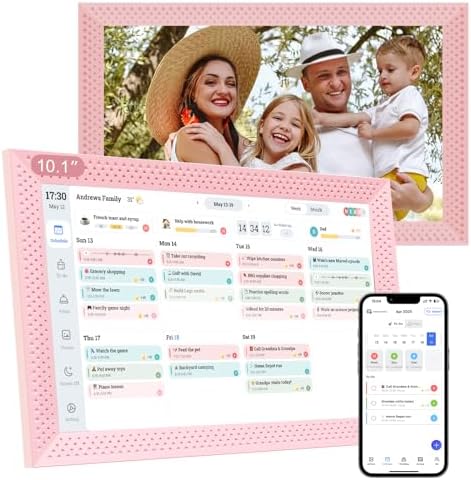
The YosaToo is a 10.1 inch smart family calendar with a touch screen display that sits on a counter or mounts on a wall. It syncs with Google Calendar, iCloud, and Microsoft Outlook over Wi-Fi through a companion mobile app, and it stacks chore rewards, meal planning, lists, and a digital photo frame on top of the calendar.
I set this digital calendar up at home, connected it to the calendars I already use, and ran through every mode to see what holds up and what falls short. The short version is that for a no-subscription family display, it handles the core scheduling job well, with a few honest trade-offs worth knowing before you buy.
What I Liked
The YosaToo earned its spot on my counter in a few clear areas during testing. Here is what stood out.
A bright, responsive 10.1-inch HD IPS touchscreen
The 10.1 inch HD IPS display is bright, sharp, and easy to read across the room. Taps register quickly, the calendar view scrolls smoothly, and the interface is intuitive enough that I never reached for the manual after setup.
Quick setup that syncs with Google Calendar and iCloud
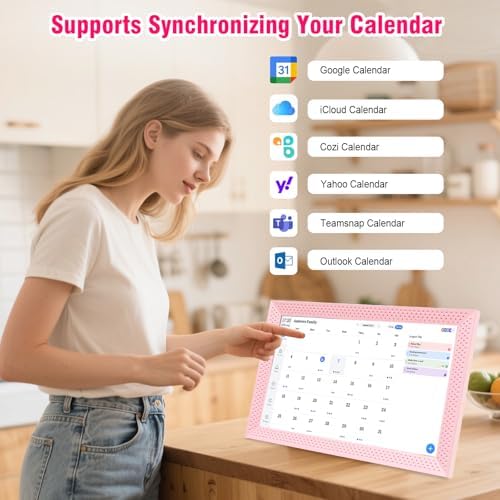
Setup took only a few minutes. You connect to Wi-Fi, scan a pairing code into the companion eCalendar app, and the digital calendar imports the past three months and next six months of events from Google Calendar, iCloud, Outlook, or Yahoo automatically.
Real-time family scheduling with color-coded profiles
This is where the smart digital calendar shines for busy families. You add a profile for each member, give them a color, and assign tasks to each family member, so everyone’s schedule shows up on one screen without blending together. Once it is connected, the online calendar updates in real time.
An interactive chore chart and star rewards system for kids
Parents create chores on the interactive chore chart and attach star rewards, and kids check tasks off to earn them. You can set reminders as a pop-up or alarm clock alert, assign chores to specific members, and the reward system makes nagging a little less necessary.
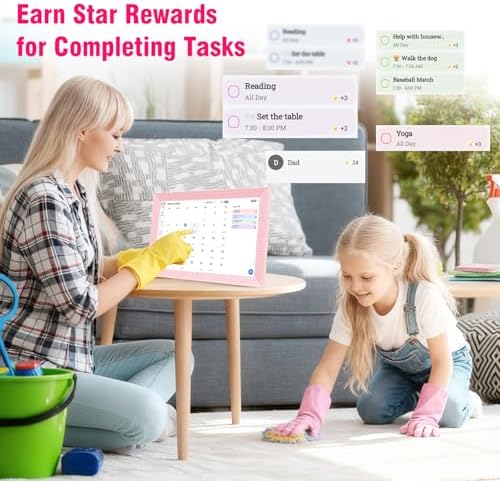
A genuinely useful meal planner with recipe suggestions
The meal planner was the surprise. You schedule meals on a calendar, pull from preset recipes with instructions, and the whole family can see what’s for dinner, which quietly kills the daily dinner debate. You can also keep custom lists, like a shared grocery list, in the same place.
Digital photo frame and art gallery mode built in
When it is idle, the digital photo frame takes over as a screensaver, showing photos loaded over the app or a microSD card, much like a standalone digital frame. There is also an art gallery mode with tagged public-domain paintings, which most digital picture frames in this price range skip.
All the core features with no monthly subscription
Every feature here, from the chore chart to meal planning, works with no monthly subscription. That alone separates it from the wall calendars that lock scheduling and chores behind a recurring fee.
What Needs Improvement
No device is perfect, and the YosaToo has a few limits worth weighing.
The companion app is a display layer, not a full calendar
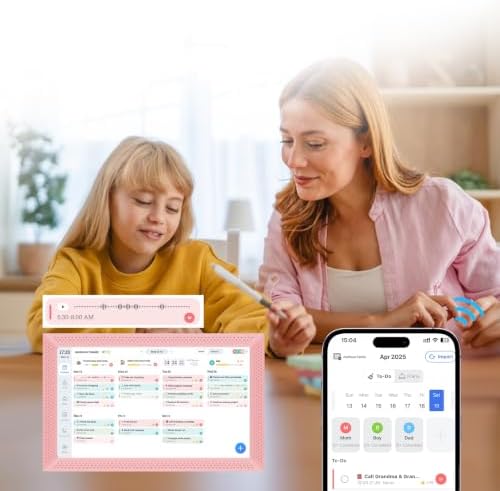
The biggest one is depth. The companion app is a coordination display, not a full replacement for Google Calendar or Apple Calendar, so detailed event descriptions, conference links, and long notes still live on your phone. If you manage your life inside a power-user calendar app, treat this as a mirror, not the source.
It needs constant power because there is no battery
There is no battery inside, so the calendar has to stay plugged in the entire time. That is fine near an outlet, but it limits where you can place it and means a wall mount needs a nearby power source.
The outer plastic shell feels a little cheap
The build is a mixed bag. The unit is heavier than you would expect, which feels reassuring, but the plastic shell still feels a little cheap up close for the price.
Editing events is easier on your phone than on-screen
Entering events directly on the touchscreen display works, but it is slower than typing on your phone or computer. I ended up adding most events on my phone and using the screen mainly to display them, which is the smoother workflow anyway.
How It Compares
The digital calendar market runs from budget panels to premium subscription hubs. Here is where this 10.1 inch smart digital calendar lands against the names buyers cross-shop.
vs Skylight Calendar
Skylight is the polished pick, with a clean interface and reliable two-way sync that show up across Amazon customer reviews. The catch is cost: the hardware runs a few hundred dollars and a Skylight Plus subscription (around $79 a year) gates chores and meal planning. The YosaToo delivers those same family scheduling tools for a fraction of the price with no recurring fee, though Skylight’s app is more refined.
vs Cozyla Calendar
The Cozyla calendar is the closest in spirit, since it also skips a required subscription and syncs with Google, iCloud, and Outlook. Cozyla offers larger screens and an Android-style, widget-based interface, but it costs far more and several owners say it feels like a tablet on the wall. The YosaToo is simpler and cheaper, trading screen size and customization for a focused, appliance-like experience.
vs Dragon Touch and DIY options
The Dragon Touch digital calendar is the other budget, no-subscription option, covering the basics without much flair. Compared with app-only tools like Cozi or a DIY DAKboard on a spare monitor, the YosaToo wins on being a finished, all-in-one display. For families who just want one of the best digital calendars to hang up and use, it is an easy on-ramp.
Final Verdict
The YosaToo Digital Calendar 10.1 is a no-subscription smart family calendar that nails the core job: getting everyone’s schedule, chores, and meals onto one shared screen without a recurring fee.
At 4.0 out of 5, it earns a solid recommendation. The calendar sync is reliable, the kids’ chore and rewards system is genuinely practical, and the meal planner with recipe suggestions was a welcome surprise. It loses ground for a companion app that is more of a display layer than a full calendar, a plastic shell that feels a little cheap, and the need to stay plugged in.
Bottom line: if you want a shared household display that keeps a busy family coordinated and looks good doing it, the YosaToo is well worth checking out.
Specifications
| Brand | YosaToo |
| Screen Size | 10.1 inches |
| Resolution | 1280 x 800 (HD IPS) |
| Display Type | IPS touch screen |
| Mounting | Magnetic desk stand or wall mount |
| Power | AC powered (no battery) |
| Calendar Sync | Google, iCloud, Outlook, Yahoo |
| Companion App | Photo Queue |
| Subscription | None required |
| Connectivity | Wi-Fi |
| Colors | Black, white, or pink |
| Storage Expansion | microSD card slot |
| Warranty | 1 year |
Frequently Asked Questions
Does the YosaToo Digital Calendar require a monthly subscription?
No. Every feature, including the calendar sync, interactive chore chart, meal planning, lists, and the digital photo frame, works with no monthly subscription. That is its main advantage over a device like the Skylight Calendar, which charges a yearly fee for the same family tools.
Does the YosaToo Digital Calendar need a Wi-Fi connection to work?
Yes. The calendar connects to Wi-Fi to pair with the companion app and to sync your events in real time. It also needs to stay plugged in the whole time because there is no internal battery.
Which calendars does the YosaToo sync with, and how do family members add one?
It syncs with Google Calendar, iCloud, Microsoft Outlook, and Yahoo through the companion mobile app. After scanning the pairing code, it imports the past three months and next six months of events automatically, and each family member can pair the app to add and color-code their own schedule.
Does the YosaToo offer chore rewards and meal planning features?
Yes, and both are free. Parents assign chores on an interactive chore chart with star rewards for kids, and the built-in meal planner lets you schedule meals and pull from preset recipes so everyone can see what's for dinner.
Can the YosaToo Digital Calendar be wall mounted or placed on a stand?
Both. It ships with a magnetic stand for a counter or desk and can also hang on a wall. The display auto-rotates and has adjustable brightness and a sleep mode, so it adapts to wherever you put it.
Is the YosaToo a good Skylight or Cozyla alternative?
For budget-minded families, yes. It delivers the core shared calendar, chores, and meal planning of pricier hubs at a much lower price with no subscription. Skylight has a more polished app and Cozyla offers larger screens, but both cost considerably more.
Ready to Buy?
YosaToo 10.1-Inch Smart Family Calendar delivers on its promises. If it fits your needs, it's a solid choice you won't regret.
Check Price on Amazon Founder & Product Reviewer at TheReviewRewind
Daniel has tested 400+ products across 20+ categories through hands-on, real-world testing. Every review includes video documentation and standardized scoring criteria. His reviews appear as Amazon shoppable videos and here on TheReviewRewind.
We earn a commission if you make a purchase, at no extra cost to you. This does not influence our ratings or recommendations. Full disclosure
Looking for more options? See all our Office Products reviews.
Related Reviews