Uineer Vertical Ergonomic Mouse Review: A $20 Fix for Wrist Strain?


Uineer Vertical Ergonomic Mouse Review: A $20 Fix for Wrist Strain?
Uineer Vertical Ergonomic Mouse
Buy if you spend all day on a mouse and feel it in your wrist by evening, or you switch between a laptop, tablet, and PC and want silent clicks. Skip if you're a competitive gamer who needs pinpoint precision, or you want flagship build quality over a budget pick.
Buy on AmazonWhat We Liked
- Genuine Wrist and Forearm Relief
- Silent Left and Right Clicks
- Tri-Mode Wireless With 3-Device Switching
- A Rechargeable Battery You Can Actually Read
- On-the-Fly DPI Switching From 800 to 2400
- Light Weight That Comfortably Fits Larger Hands
What Could Be Better
- A Slick Shell That Lacks Grip
- Battery Life Is Inconsistent
- No DPI Level Indicator
- Budget Build With Occasional QC Complaints
How we test: Every product is used in real conditions and evaluated using our standardized scoring criteria. Read our full review methodology.
If your wrist is sore and stiff by the end of a workday, it is probably not you. It is the flat mouse you have been twisting your hand onto for eight hours straight.
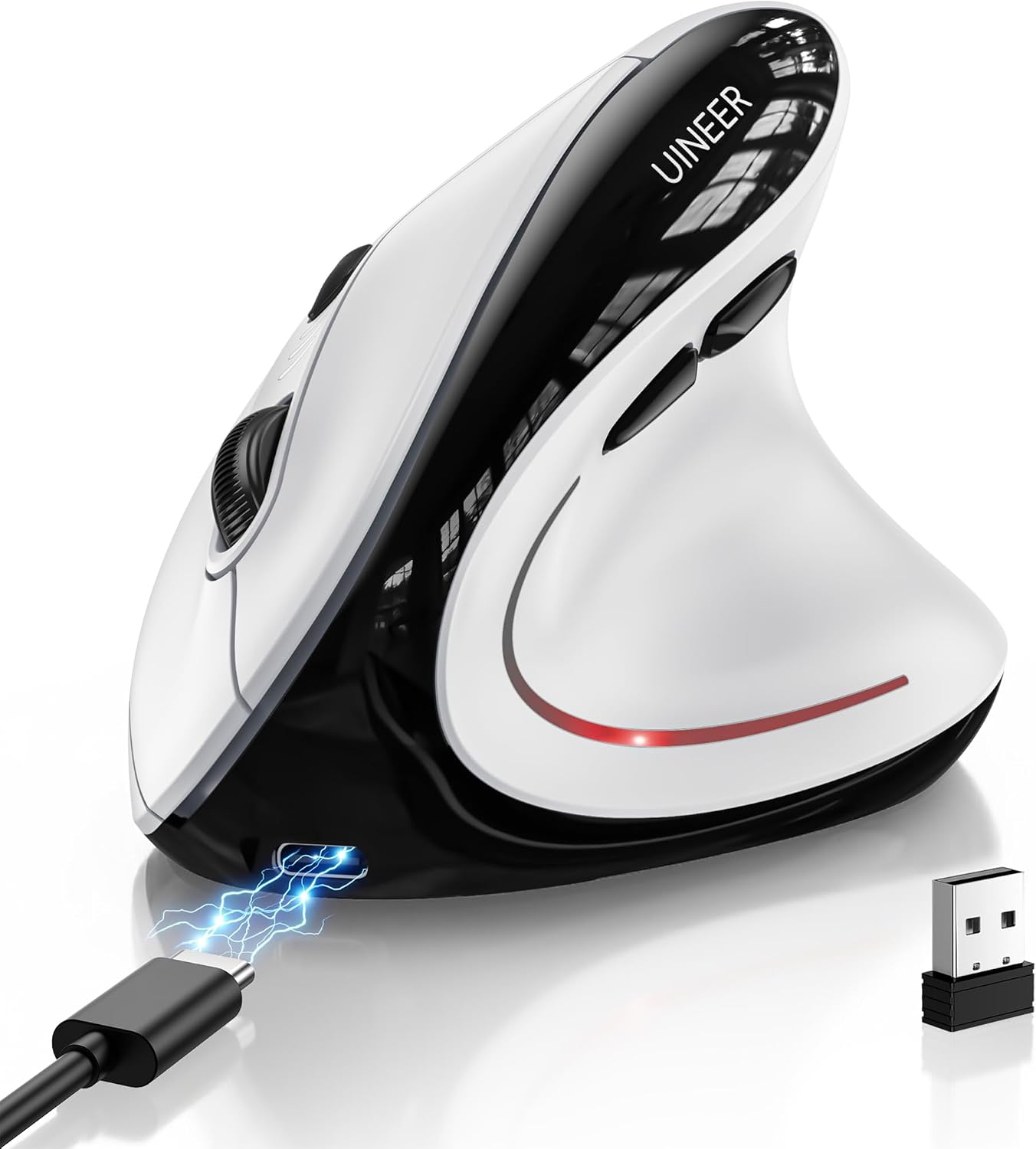
The Uineer Vertical Ergonomic Mouse (model A9) is a wireless vertical mouse that stands on its side, so your hand holds it in a natural handshake grip instead of lying flat. It runs about $20, connects three ways, and switches between three paired devices with a button.
I have been using ergonomic mice for a decade, and I put this budget vertical mouse through my normal work-and-multi-device routine to see where the corners were cut. That covered the silent clicks, the tri-mode wireless, the DPI switching, and the small battery detail I did not expect to care about.
The short version? For the price, it fixes a hand position that has been quietly wearing you down. There are a few budget trade-offs worth knowing about first.
What I Liked
The Uineer earns its keep in a few specific areas during daily desk work. Here is what stood out as I tested it.
Genuine Wrist and Forearm Relief
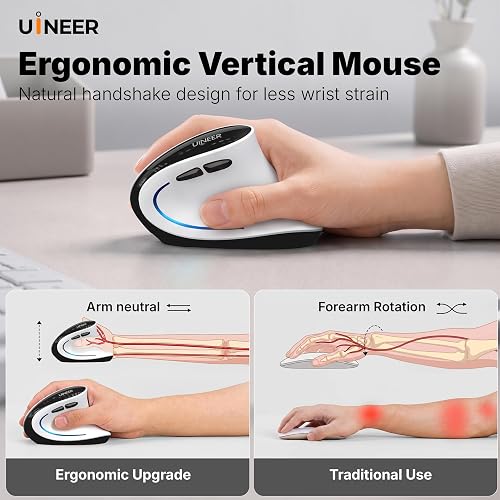
The shape is the whole point here. Your thumb sits in a groove on the left, and your hand rests at a natural angle instead of being flattened onto the desk, which keeps your wrist straight and your forearm relaxed.
A normal flat mouse forces your forearm to twist so your palm faces down, and I can feel that tension the moment I switch back to one. After a decade of wrist trouble with regular mice, a vertical ergonomic mouse like this is the kind of switch that takes strain off a long day.
Amazon buyers echo it: one nine-to-five worker wrote that with a regular mouse the wrist still feels fatigued, but “with this, I don’t feel any pain or stiffness anymore.” An RSI sufferer added that the hand position “feels more natural because I’m not required to break the line of my wrist.” When the goal is to avoid needless mouse movement entirely, the Yonktoo Mouse Jiggler keeps your status active so you are not nudging the cursor just to look busy.

Silent Left and Right Clicks
The two main buttons are close to silent. In my sound test you can barely hear the left and right click at all, which matters in a quiet office, a library, a shared room, or late at night while someone else is asleep.
The scroll-wheel click, DPI button, and thumb buttons are a little louder, so this is not completely silent across every input. For the clicks you make most, though, you are not filling the room with that constant clatter. Uineer carries the same near-silent main clicks to its newer A06 model, the Uineer A06 Vertical Ergonomic Mouse, which adds a battery charge gauge for around $27.
Tri-Mode Wireless With 3-Device Switching
The Uineer connects three ways: Bluetooth 5.0, Bluetooth 4.0, and 2.4GHz wireless through a small USB-A receiver. The 2.4GHz dongle is the plug-and-play option, with no pairing menu, and it tucks away inside the mouse so it will not fall out in a bag.
The feature I used most is the three-device switching. You can pair a work laptop, a personal laptop, and an iPad at once, then jump between them with the mode button instead of re-pairing every time.
That mouse multi device flexibility is a real convenience if you bounce between a Windows PC, a Mac, and a tablet. It works across Windows, Mac, iPad, Chrome OS, and Linux. If you want a keyboard that switches between the same machines just as easily, the YUNZII B87 wireless mechanical keyboard pairs with up to five devices over tri-mode wireless. To wire those monitors and peripherals into one connection at your desk, the Hiearcool USB-C dock turns a single laptop port into eleven.
A Rechargeable Battery You Can Actually Read
Inside is a 500mAh rechargeable battery that recharges in about two hours over the included USB-A to USB-C cable. Instead of buying and swapping AA batteries forever, you top it up, and you can keep working while it charges.
The detail I liked more than expected is the three LED lights that show the battery level. You get a heads-up before it dies instead of it quitting on you mid-task, and one buyer confirmed the lights flash when it is time to charge.
On-the-Fly DPI Switching From 800 to 2400
A button up top cycles the DPI, which sets cursor speed, through four levels: 800, 1200, 1600, and 2400. You can slow it down for detail work like lining things up in a spreadsheet, or speed it up to fly across two monitors.
Being able to change it on the fly, rather than digging into settings, is a small thing that turns out to be handy day to day. One reviewer who edits photos called out how the lower settings help with precision and the higher ones speed up browsing.
Light Weight That Comfortably Fits Larger Hands
At roughly 105 grams, the Uineer is light enough that it is not tiring to move around all day. It is a trade-off, since that low weight is part of why it feels less premium, but I never worried about wearing my arm out dragging it across the desk.
It also fits a bigger grip comfortably, which not every vertical mouse manages. A reviewer with L-XL sized hands called it the design they had sought over two years of testing vertical mice, and another with small hands said it still worked, so the size lands in a usable middle ground.
What Needs Improvement
No $20 mouse is flawless, and the Uineer has a handful of budget compromises. None were dealbreakers for me, but they are worth knowing before you buy.
A Slick Shell That Lacks Grip
The outer surface is smooth and slick rather than textured. If you like a grippier shell, keep that in mind, because the Uineer does not have one.
More than one buyer felt the same way. One four-star reviewer wished “the surface had a bit of grip, it’s very slippery,” and knocked off a star for it. It is a comfort preference more than a fault, but a more premium mouse like the Logitech Lift adds texture the Uineer skips.
Battery Life Is Inconsistent
The brand rates the battery for weeks per charge, and real-world results are all over the map. One nine-to-five user got about a month of workday use, but another said it “only held power for 10 days” and returned it over that plus a slight wake-from-sleep lag.
The good news is the LED gauge and flashing low-battery warning give you a heads-up, and you can keep working while it charges. Still, if you want a mouse you charge once a month and forget, this may not reliably deliver it.
No DPI Level Indicator
You can cycle through four DPI levels, but there is nothing on the mouse or the screen to tell you which one you are on. The manual suggests watching the cursor to work it out for yourself, which one reviewer fairly called “very vague.”
It is a minor annoyance rather than a real problem. Once you settle on a setting you tend to leave it, but a numeric readout would remove the guesswork.
Budget Build With Occasional QC Complaints
The Uineer is light and, in the hand, feels a little cheap. That is largely the price talking, and it never felt like it would break during my testing.
One critical reviewer had a rougher time: after cleaning the mouse once, the left-click button became misaligned and pushed inward, and a replacement did the same within weeks. That reads as a quality-control risk rather than a universal defect, but it is a fair reason to lean on the two-year warranty.
How It Compares
The obvious benchmark is the Logitech Lift, and I put the two side by side. The Logitech is taller, heavier, and has more grip to its shell, and it feels more premium in the hand than the Uineer does.
The catch is the gap in function does not match the gap in price. The Logitech Lift is a mid-range pick that costs roughly three to four times as much, and RTINGS notes some configurations skip the Bluetooth multi-device switching that the Uineer includes as standard. In my testing the Uineer handled the same tasks just as effectively, so unless you specifically want that premium build, the budget vertical mouse does the job.
Step up to the Logitech MX Vertical and you get a flagship with a 57-degree angle and long battery life, but you pay flagship money for it. It suits people who want the best build quality in everything they buy, which is exactly the buyer the Uineer is not chasing.
Among sub-$25 rivals, the Ugreen M571 is the one shoppers cross-shop most, offering a similar silent-click, wireless handshake grip at a comparable price. If you would rather avoid a vertical shape altogether, a trackball mouse such as the Logitech M575 keeps your hand still and moves the cursor with your thumb, which is a different fix for the same wrist strain. For value in a straightforward vertical, though, the Uineer covers the essentials most people actually use.
Final Verdict
The Uineer Vertical Ergonomic Mouse is an affordable, low-effort way to fix a hand position that has been quietly wearing you down, and it covers the features that matter most for work and multi-device setups.
I am giving it a 4.2 out of 5.
It loses a little for the slick shell, the inconsistent battery life, the missing DPI indicator, and a budget build that draws the odd quality-control complaint. The genuine wrist relief, silent clicks, tri-mode wireless, three-device switching, and readable battery gauge more than make up for it at this price.
Bottom line: If you deal with wrist strain from a regular mouse and want a comfortable vertical without spending flagship money, the Uineer is an easy one to recommend.
Specifications
| additional_features | Ergonomic Design, RGB Lights, Rechargeable, Soundless, Wireless |
| antenna_location | Office |
| battery_average_life | 168 hours |
| brand | Uineer |
| button_quantity | 6 |
| color | Black and White |
| compatible_devices | Personal Computer, Smartphone, Tablet |
| connectivity_technology | Bluetooth, USB |
| enclosure_material | Plastic |
| hand_orientation | Right |
| hardware_platform | Laptop, Mac, PC |
| item_weight | 3.2 ounces |
| manufacturer | UINEER |
| mfr_part_number | A9 |
| minimum_required_operating_system_version | Windows 8 |
| model_name | A9 |
| model_number | A9 |
| mouse_maximum_sensitivity | 2400 dots_per_inch |
| movement_detection | Optical |
| number_of_batteries | 1 C batteries required. (included) |
| operating_system | Chrome OS, Linux, Windows 10, Windows 8, Windows Vista |
| power_source | Rechargeable |
| unit_count | 1 Count |
| warranty_description | 2 Year Manufacturer |
Frequently Asked Questions
Is the Uineer Vertical Ergonomic Mouse good for carpal tunnel or wrist pain?
It is designed for exactly that. The vertical shape holds your hand in a natural handshake grip so your wrist stays straight and your forearm stays relaxed, which takes strain off a long day. Several Amazon buyers with RSI and early carpal tunnel reported noticeably less fatigue after switching, though a vertical mouse is not a medical device and results vary.
What are the disadvantages of the Uineer Vertical Ergonomic Mouse?
The main trade-offs are a slick shell with no grip texture, inconsistent battery life between users, and no indicator to show which of the four DPI levels you are on. The build is light and a little cheap-feeling, and one reviewer reported a left-click that misaligned over time. Most are budget compromises rather than dealbreakers.
Does the Uineer Vertical Ergonomic Mouse work with Mac, iPad, and Windows?
Yes. It works across Windows, Mac, iPad, Chrome OS, and Linux. You can connect over Bluetooth 5.0, Bluetooth 4.0, or the 2.4GHz USB-A receiver, so most laptops, desktops, and tablets are covered.
How many devices can the Uineer Vertical Ergonomic Mouse connect to at once?
Up to three. You can pair a work laptop, a personal laptop, and a tablet at the same time, then jump between them with the mode button instead of re-pairing. It is one of the most useful features for a multi-device desk setup.
How long does the Uineer Vertical Ergonomic Mouse battery last?
The 500mAh battery is rated for weeks per charge and recharges in about two hours over the included USB-C cable. Real-world reports range from around 10 days to a full month of workday use. Three LED lights show the level and flash when it is low, and you can keep working while it charges.
Is the Uineer Vertical Ergonomic Mouse worth it for the price?
At roughly $20 it is strong value for a comfortable vertical mouse with silent clicks, tri-mode wireless, and three-device switching. You give up the premium build and grippy shell of a mouse like the Logitech Lift, which costs several times more. For most people who just want wrist relief, the Uineer covers the essentials.
Ready to Buy?
Uineer Vertical Ergonomic Mouse delivers on its promises. If it fits your needs, it's a solid choice you won't regret.
Check Price on Amazon Founder & Product Reviewer at TheReviewRewind
Daniel has tested 400+ products across 20+ categories through hands-on, real-world testing. Every review includes video documentation and standardized scoring criteria. His reviews appear as Amazon shoppable videos and here on TheReviewRewind.
We earn a commission if you make a purchase, at no extra cost to you. This does not influence our ratings or recommendations. Full disclosure
Looking for more options? See all our Computers reviews.
Related Reviews